Music Player & MP3 Player
- 4.8
- Rating
- 100.00M
- Installs
- Free
- Price

 Analysis by App-foxy
I installed Music Player & MP3 Player expecting a straightforward way to play audio stored on my phone, and that is still the best way to understand it. It is a free music and audio app from InShot Inc., aimed at people who want their own tracks available without depending on a streaming subscription or a constant internet connection. After using it as a local library, a quick listening tool, and a small audio-organizing workspace, I found it more capable than its short name suggests, although its usefulness depends heavily on how tidy your music files already are.
The app has a 4.8 average from around 4.3 million ratings, with more than 100 million installs. Those figures make sense to me: it solves a familiar problem with very little setup. You open it, let it find compatible audio on the device, and start listening. The experience is not built around discovering artists or maintaining an online catalog. It is built around taking music you already have and making it easier to browse, adjust, and play.
From scattered files to a usable music library
My starting point was a phone containing a mixture of downloaded songs, old MP3 files, and tracks copied from another device. This is the situation where the app makes the strongest first impression. Instead of treating every file as something I had to locate manually, it presents the collection through familiar music categories and playback controls. The transition from “files on my phone” to “music I can actually browse” is the central benefit.
You May Also Like

 AccuWeather: Weather Radar
AccuWeather Review: A Quick, Clear Forecast for Everyday Decisions
For everyday plans, the best forecast is the one you can understand quickly. AccuWeather makes rain timing, radar, and local conditions easy to act on, with a few trade-offs.

 Hill Climb Racing
Why Hill Climb Racing Still Turns Crashes Into One More Run
A tiny car, a bumpy hill and one more upgrade: Hill Climb Racing keeps resurfacing because its simple chaos makes every near-miss feel personal.

 AliExpress - Shopping App
AliExpress Makes Global Shopping Feel Personal, but Shoppers Bear the Risk
AliExpress turns a global marketplace into a pocket-sized discovery engine. Its reach is useful, its shopping loop compelling, and its trade-offs easy to miss.

 Lords Mobile: Kingdom Wars
Lords Mobile Is a Kingdom-Building Routine, Not a Quick Match
A case-by-case verdict on the building, battles, device demands, and social commitments that make Lords Mobile rewarding for some players and exhausting for others.

 PDF Scanner app - TapScanner
TapScanner Makes Paperwork Easier to Capture, Check, and Share
TapScanner makes scanning with a phone feel less like a rescue operation and more like a dependable step in getting work done. Its capture tools are useful, though not flawless.

 Block Blast!
 Shows How Much a Puzzle Game Can Leave Out
A quiet grid game shows why puzzle players increasingly value instant clarity, repeatable skill and low-pressure play—and where the genre still needs to catch up.
More From Our News Desk
View All News


That workflow is especially useful for listeners who keep personal recordings, legally obtained MP3s, albums purchased elsewhere, or audio saved for travel. It also suits anyone who dislikes having several streaming apps competing for attention. Because the player is designed for offline listening, I can use it in places where mobile data is inconvenient or unavailable, provided the music has already been placed on the device.
The first practical tip is to think about file preparation before blaming the player for a messy library. If songs have inconsistent artist or album tags, any music app will have trouble grouping them sensibly. Music Player & MP3 Player includes a tag editor, so I can correct details from inside the listening workflow rather than immediately opening a separate file-management tool. That is a useful handoff: the track is not merely played, but also brought closer to the way I want the library displayed.
I would not call the setup completely automatic in every situation. A phone with badly named files can still require patience, and the app cannot turn missing artwork or incomplete metadata into perfect information by itself. My advice is to begin with a small folder or one album, correct the most obvious labels, and then expand the collection. That approach makes the library easier to understand and exposes problems early.
Building the listening routine
Once the tracks were visible, I moved through the app as I would during an ordinary day. I selected an album for focused listening, switched to individual songs when I wanted something specific, and used the player controls rather than returning to a file browser. This is where a dedicated local player feels more comfortable than a generic storage app: the music becomes the main object, not an attachment hidden among documents and images.
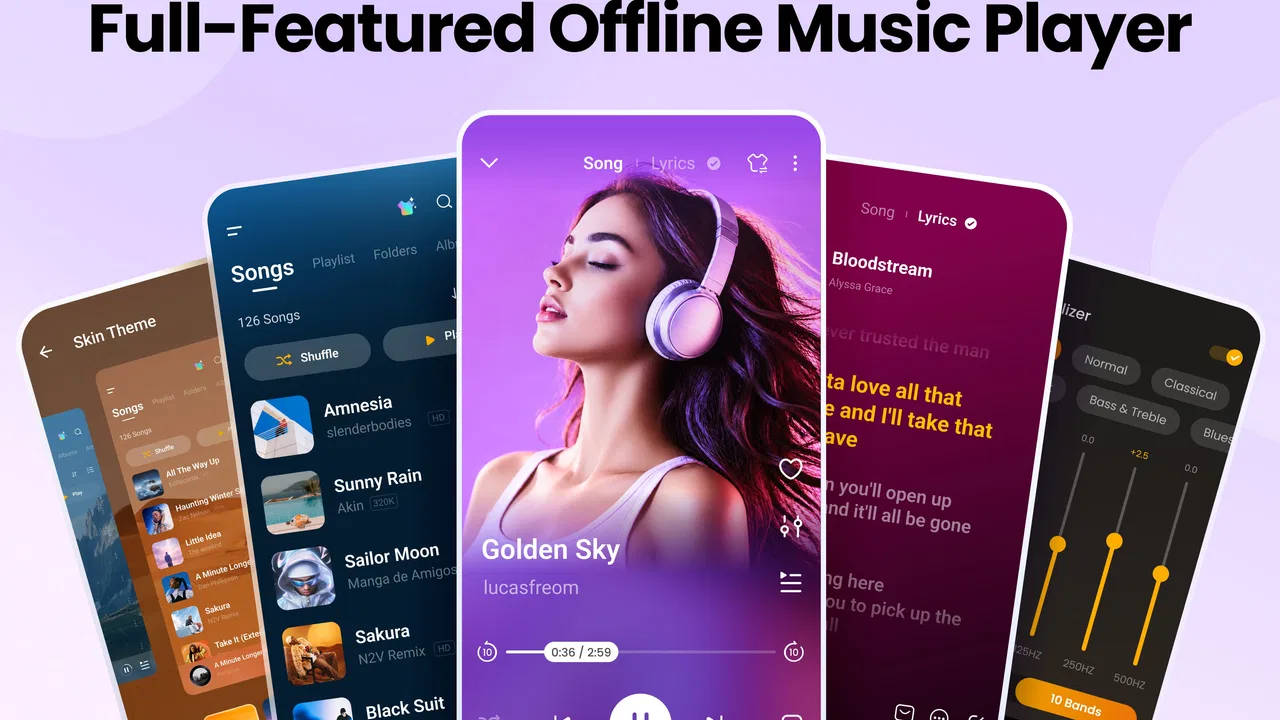
The equalizer is one of the more meaningful additions. I used it as a correction tool rather than a reason to make every song louder. A pair of headphones that sounded slightly thin benefited from a modest adjustment, while another set already had plenty of bass and needed a gentler profile. The important trade-off is that equalizer settings are personal. A dramatic preset may sound exciting for a few minutes but become tiring during a full album, so I prefer small changes and checking them at a normal listening volume.
This is also a good place to mention a less obvious use case: the app can act as a simple listening test between headphones or speakers. I can play the same familiar track, adjust the equalizer back to a neutral position, and compare how different hardware handles it. That does not replace professional audio tools, but it is more practical than judging equipment with a different streaming version of every song.
The lyrics feature adds another layer for people who like to follow along. Its usefulness depends on whether suitable lyric information is available for the track, so I see it as a helpful companion rather than the reason to choose the app. When it works with a song I already have, it keeps the lyrics and playback in the same place. When I am listening casually, I can ignore that layer and use the player normally.
A realistic commute and handoff
My most realistic test was a commute with a playlist prepared before leaving home. The desired outcome was simple: choose music once, put the phone away, and avoid depending on a signal. The app handled that kind of session naturally because the tracks were local. I did not need to search an online catalog, wait for artwork to load, or wonder whether a favorite album would remain available after a connection changed.
The handoff from preparation to playback is important. I can edit a title at home, check the album grouping, and then use the same library later while traveling. If I share audio files with another device or receive new tracks from a computer, the app becomes the final step that turns those files into something listenable. That makes it more useful than a player that only offers a basic play button, but it also means the quality of the result depends on the files handed to it.
Themes are another customization option. I treated them as a comfort feature rather than a major reason to install the app. A different visual style can make the player feel more personal, particularly for someone who spends a lot of time browsing a local collection. Still, themes do not improve audio quality or repair disorganized metadata, so I would set them after the library and playback behavior are working properly.
For a family member who wants a simple offline player, I would explain the workflow this way: put music on the phone, open the app, check that the songs appear, fix any incorrect labels with the tag editor, and then use albums, artists, or individual tracks as needed. The Everyone content rating also makes it a broadly approachable choice for general household use, though ease of use will still depend on how familiar the person is with managing audio files.
What the finished result feels like
After the library was organized, the result was a compact music setup that did not try to do too much. I could listen offline, make sensible sound adjustments, read lyrics when available, and improve track information without switching between several unrelated tools. That combination is the app’s real strength. None of these elements alone is unusual, but together they cover the complete path from a loose collection of files to a comfortable listening session.
The tag editor deserves particular credit because it changes the long-term value of the library. Correcting an artist name or album title may sound minor, but it prevents repeated searching later. I found it more efficient to repair metadata while a song was already in front of me than to postpone the task and forget which files needed attention. For large collections, I would still work gradually; editing every track in one sitting could become tedious.
The equalizer also gives the app a practical advantage over the most basic built-in players. A phone’s default audio tool may play a file perfectly well but offer little control over how it sounds through different headphones. Here, I can make a listening profile that suits my equipment and then return to normal playback when I change devices. The limitation is that audio adjustment can become a distraction. If you constantly chase the “perfect” setting, the player stops being convenient.
Compared with streaming services, this app gives me ownership of the playback environment rather than access to a huge online catalog. Streaming is better when I want recommendations, new releases, shared playlists, or music I do not already possess. Music Player & MP3 Player is better when I want predictable offline access to a personal collection. I would not install it as a replacement for every streaming service; I would use it beside one, or instead of one if my listening is already file-based.
Compared with a phone’s default music player, it offers more attention to customization through themes, lyrics, equalizer controls, and tag editing. The default option may remain preferable for someone who only needs to tap a song and play it. The choice becomes clearer when the library needs maintenance or the sound needs adjustment. In that situation, the extra controls justify spending a little time learning where they are.
Where the workflow becomes less comfortable
The biggest break in the flow occurs before playback: getting the right files onto the phone and keeping their information consistent. This is not an app that magically supplies a complete music catalog. Someone who mainly listens through cloud services may find the local-library approach less convenient because it adds a preparation step. If your music exists only inside an online account, this player is not the natural first choice.
Another friction point is the difference between a feature being present and it being equally useful for every track. Lyrics are valuable when the song has usable lyric information, but they should not be treated as a guaranteed replacement for a dedicated lyrics service. The tag editor is powerful in a practical sense, yet it asks for user involvement. The equalizer can improve an imperfect match between headphones and music, but poor adjustments can make the result worse.
I also noticed that a feature-rich local player can feel busier than a minimal one. Someone who wants only play, pause, and volume may prefer a simpler alternative. The app rewards a listener who cares about organizing albums, adjusting sound, or personalizing the interface. It is less compelling for a person who never keeps local audio and does not want to manage it.
Storage habits matter as well. A growing offline library needs sensible organization, and I would avoid dumping every audio file into one unlabelled folder. Even with a tag editor available, a clean starting structure reduces the amount of correction later. This is one of the practical lessons I took from using it: the app can improve a local collection, but it works best when the user treats that collection as something worth maintaining.
There is also a cost boundary to keep in mind. The app is free to install and use as a general music player, while in-app purchases range from $0.99 to $6.99 per item. I would approach those purchases as optional customization or convenience decisions rather than assuming they are necessary for basic listening. If your priority is simply playing your own MP3 files offline, begin with the free experience and decide later whether the additional options matter to your routine.
Who should install it, and who should look elsewhere
I recommend it to people with a personal MP3 collection, commuters who want dependable offline playback, listeners who switch headphones and appreciate an equalizer, and anyone frustrated by incorrect artist or album labels. It is also a sensible companion for a streaming user who keeps certain albums locally for travel, backup listening, or situations where a connection is unreliable.
I would point a recommendation engine enthusiast toward a streaming app instead. If the main pleasure comes from algorithmic discovery, social sharing, cloud synchronization, or instantly exploring music that is not already on the phone, this local player will feel limited by design. I would also suggest a simpler player to someone who finds metadata editing and sound controls unnecessary.
Device compatibility is reasonably accessible because it supports Android 6.0 and later. The current version is 4.0.1.180, and the app comes from InShot Inc., a developer already associated with widely used mobile creative tools. I would still check the version available for the particular device before installing, especially on an older phone, but the stated minimum makes it available to a broad range of Android users.
After the full input-to-outcome workflow, my opinion is positive but specific: Music Player & MP3 Player is strongest as a hands-on offline library tool, not as an all-purpose replacement for streaming. It gives local files a better home, adds useful control through the equalizer and tag editor, and makes lyrics and themes available without overwhelming the basic listening path. Its weak point is the work surrounding the files. If you are willing to prepare and maintain your collection, I think it is a worthwhile free download. If you want music to arrive already organized from an online catalog, another kind of app will fit your habits better.
For my own use, the deciding advantage is the handoff from organization to everyday listening. I can repair a track once, adjust playback for my headphones, and then return to the library without rebuilding the experience each time. That is a modest benefit, but it is exactly the kind that becomes noticeable after weeks of use. I would install it for a local collection, keep expectations realistic about lyrics and metadata, and let the free version prove whether its extra controls genuinely improve the way I listen.
FAQs for Music Player & MP3 Player
01What file formats does the Music Player & MP3 Player support?
The Music Player & MP3 Player supports a wide variety of audio file formats including MP3, AAC, WAV, FLAC, and more. This extensive compatibility ensures you can play nearly any audio file you have stored on your device, making it a versatile choice for music lovers.
02Can I create and manage playlists within the app?
Yes, the app allows you to create and manage playlists easily. You can organize your music by adding songs to existing playlists or creating new ones. This feature helps you customize your listening experience by categorizing your favorite tracks based on mood, genre, or occasion.
03Does the Music Player & MP3 Player offer offline playback?
Absolutely, the app supports offline playback, allowing you to listen to your favorite tracks without an internet connection. This is particularly beneficial when traveling or in areas with poor connectivity, ensuring uninterrupted music enjoyment wherever you are.
04Is there a built-in equalizer in the app?
Yes, the Music Player & MP3 Player includes a built-in equalizer with various presets for different music genres. You can also manually adjust the sound settings to enhance your audio experience according to your preferences, providing a personalized and immersive listening experience.
05Are there any in-app purchases or ads?
The app is free to download and use, but it may contain ads. There are optional in-app purchases available that can enhance your experience, such as ad removal or additional features. This allows users to choose whether they want an ad-free experience or to enjoy the app's full capabilities.
Pros
- User-friendly interface enhances experience.
- Supports various audio formats seamlessly.
- Customizable equalizer for sound tweaking.
- Offline playback saves data usage.
- Minimal battery consumption during use.
Cons
- Ads can interrupt the listening experience.
- Limited free features without premium.
- No lyrics display for songs.
- Occasional lag on older devices.
- Playlist management could be improved.

Music Player & MP3 Player
Gallery